Accessibility
Test, track, and prioritize your web accessibility
Silktide combines automated testing, AI-powered guidance, and human expertise to help you understand accessibility issues, prioritize fixes, and measure progress.
Rated 4.8 out of 5 from 288 reviews on G2.

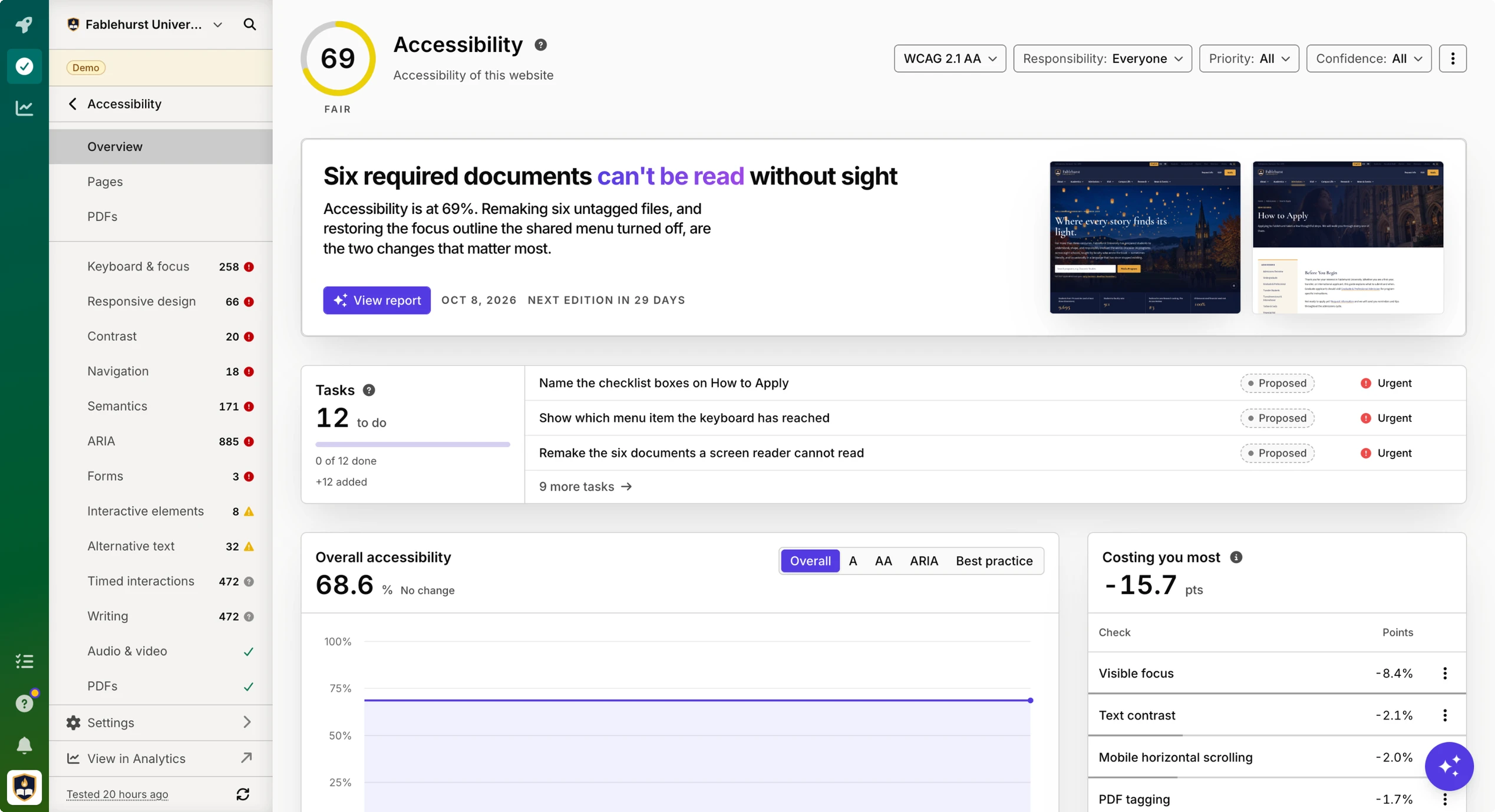
You already know your website isn’t perfect. Silktide finds issues, prioritizes them, and proposes ready-to-assign fixes.
Overview
Always be the first to know what’s broken on your website. Understand where your website stands and what needs attention.
Silktide brings your accessibility results, priorities, and progress together, so your team can spend less time interpreting reports and more time making improvements.

Understand what’s behind your score
See which checks are holding your accessibility score down and by how much. Explore the results behind each number to understand where there’s room to improve.

See your fixes make a difference
Set targets and track progress over time. Mark issues as fixed when the work is done, then retest to verify the change before it updates your score.

Automated testing
Keep checking as your website changes. Find barriers automatically.
Silktide runs scheduled accessibility tests to track what’s working and what’s broken over time. Explore the full accessibility check catalog and track every WCAG success criterion using machine checks, assisted reviews, and manual guidance.

Look closer at every issue
Use the Inspector to explore a problem in context. Page maps and screen-reader previews help your team understand the page, while Ask AI explains findings with that page already in view.

Put your findings into words
Create a draft accessibility statement based on what Silktide found. Review and refine it before publishing, with your test results as the starting point.

AI-assisted Suggestions
Find the cause behind the issue. Get a plan to fix it.
We run carefully programmed deterministic scans of your website, then use AI to analyze those scans and propose a plan. Silktide’s AI optimizer connects the findings, identifies shared causes, and proposes specific fixes with priorities and effort estimates.

Turn findings into a plan
See the issue, the evidence behind it, and the steps your team can take. Every recommendation links back to the checks that informed it.

Give every fix a next step
Turn recommendations into tasks with clear instructions, evidence, priorities, and owners. Manage the work in Silktide with unlimited users, or send accepted tasks to your task management system.

Ask about the issue in front of you
What does this problem mean? Who does it affect? How could we fix it? Ask Silktide’s AI agent for guidance grounded in the page and issue you’re reviewing.

PDF accessibility
Understand and track every PDF on your website. Keep document accessibility in view alongside your web pages.
Bring the PDFs on your website into one shared, tracked library. Test them against PDF/UA-1, with coverage of all 136 conditions and 87 tested automatically.

Manual auditing
Go deeper with human expertise and insight. Understand the barriers that need human judgment.
Silktide’s accessibility specialists assess key pages, templates, and user journeys using real devices, keyboard navigation, and assistive technologies.
Test the journeys that matter
Explore how people navigate your website, complete forms, and use interactive features. Our experts assess the experience beyond individual automated checks.
Leave with clear next steps
Get an actionable report and a workshop to help your team understand the findings. Know what needs to change, why it matters, and how to approach the work.
Consultancy and training
Build accessibility into everyday work. Give your team the knowledge to make more accessible decisions.
From practical training for content editors to guidance on policies and processes, our specialists help you build skills and bring accessibility into your work from the start.

See accessibility in practice
Liverpool John Moores University climbs accessibility rankings with Silktide
How LJMU uses Silktide to deliver a positive impact on accessibility and workflow.

When we first started using Silktide, our accessibility score was around 67%. Now, it’s up to 94%, and we’ve climbed to 11th place in the Silktide Index.
FAQs
What is Silktide Accessibility?
Silktide Accessibility is the Governance module that tests how usable a website is for people with disabilities, including automated checks against WCAG, ARIA, and Silktide best-practice checks. It scores the whole website and its PDFs, and is included with Governance alongside Content, User Experience, and Compliance.
Does Silktide test for WCAG?
Yes. Silktide tests websites against WCAG 2.2, including Levels A, AA, and AAA. Silktide tracks all 86 WCAG 2.2 success criteria: some as automated errors, some as warnings that need a person, and the rest as guided reviews.
Does Silktide create an accessibility statement?
Yes. Silktide drafts an accessibility statement from what it found on your website. Your organization reviews the wording, contact details, dates, and any conformance claim, then publishes it. Silktide does not certify that the site meets the law.
Is Accessibility included in Silktide?
Yes. Accessibility is included with Governance. In Silktide 5, Content, Accessibility, User Experience, and Compliance ship together.
How is Silktide different from WAVE or axe?
WAVE and axe are tools for checking a page you are looking at, often in a browser. Silktide Accessibility continuously monitors the whole website and its PDFs, explains findings in context, and turns them into tasks for editors and developers. Specialist testing can still sit in an accessibility program; Silktide watches the pages nobody opened this year.
Who is Silktide Accessibility for?
Silktide Accessibility is for the central web team accountable for a large digital presence – typically in enterprise, government, higher education, finance, and healthcare – where accessibility is a legal and service obligation. Editors, developers, and leaders work from the same score, checks, and tasks.
Make your next accessibility improvement clear
See what needs attention and how Silktide can help your team move forward.